
An open-source pump.fun copy trader with a live dashboard
A ready-made pump.fun copy trading bot. Follow traders by username or wallet, copy their Solana buys and sells within your limits, and watch their PnL and trades on a live dashboard. Open source, with a demo.
16 min read
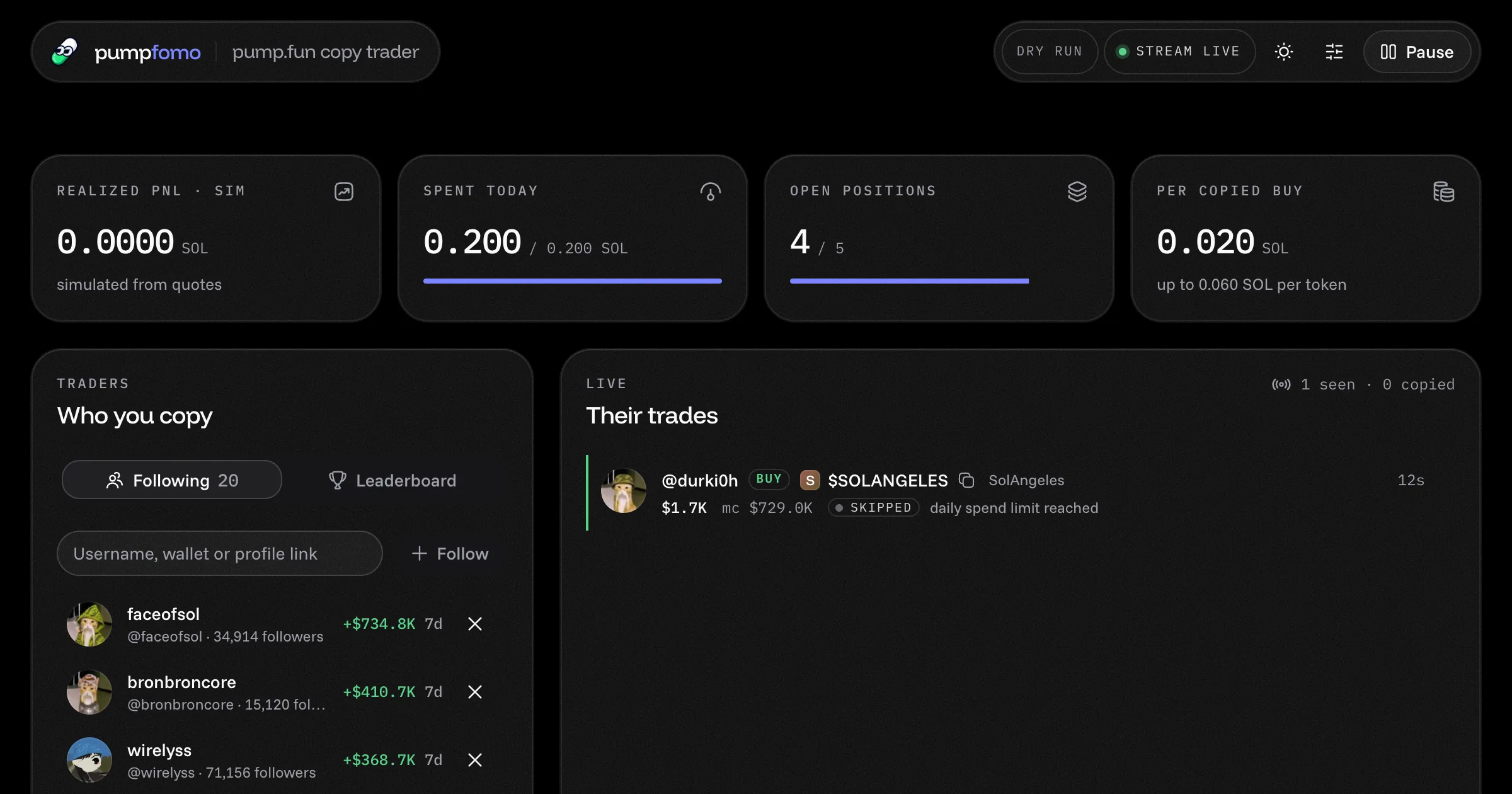
pump.fun's leaderboard tells you who made money this week. It doesn't tell you when they buy next. This app does: you pick pump.fun traders, and the moment one of them buys or sells a coin on Solana, the app makes the same trade from your wallet, at your size, inside your limits.
It's a complete Next.js app, open source under MIT, and it starts in dry run, so nothing is signed until you decide it should be. Open the live demo to watch it follow pump.fun's top traders right now, or download the code (it's also on GitHub). This page is its full documentation.
What it does
Follows pump.fun traders however you know them:
- by username
- by wallet (Solana or EVM)
- by user id or profile link
- from the daily, weekly or monthly PnL leaderboard
A trader with a profile is followed on every wallet they use. One stream follows up to 1,000 of them.
Copies their buys and sells as they happen, over one connection to the pumpfomo live stream. It never polls.
Sizes every trade your way. You set SOL per copied buy and caps per coin, per day and on open positions.
Skips what you don't want:
- small buys
- coins under a market cap
- quotes with too much price impact
- trades that arrive late
- anything on your never-buy list
Sells when they sell. A position closes in full when the trader it came from sells that coin. You can also sell it yourself from the dashboard.
Shows who you copy, with real numbers. Each trader has their picture, followers and 7-day PnL. Click one for their card: realized and unrealized PnL, what they spent, trades and volume this week, their biggest trade, and a 7-day chart of their portfolio.
Names every coin. A pump.fun trade only carries the mint. The app looks up each new coin's name, logo and market cap, 50 at a time, and shows each position's market cap at your buy and now.
Changes settings while it runs, with no restart, and stays on your machine: the dashboard answers on
127.0.0.1only.
Try the live demo
The demo runs the same app in a read-only mode:
- It follows pump.fun's top 20 traders of the week, with live data.
- Every trade they make shows up with what the app would have done about it.
- It stays in dry run, so nothing is ever signed.
- Nobody can change who it follows or its settings, and the credit balance is hidden.
When you run your own copy, all of that is yours to change.
What you need
| What | Why |
|---|---|
| Node.js 22 or newer | The app uses Node's built-in WebSocket and fetch. |
A pumpfomo API key with the stream scope |
Streams come with Builder and up, at $149 a month or $1,249.90 a year. Free and Starter keys can't open a stream. See pricing. |
| A Jupiter API key (optional in dry run) | For real quotes and swaps. It's free at portal.jup.ag. Without one, dry run records trades with no amounts. |
| A Solana wallet (live only) | A wallet of its own, holding only what you're ready to lose. |
Each running copy of the app holds one stream. To run this app and the fomo.family copy trader at the same time you need two streams, which is the Growth plan.
Quick start
curl -LO https://pumpfomo.com/downloads/pumpfun-copy-trader.zip
unzip pumpfun-copy-trader.zip
cd pumpfun-copy-trader
npm install
cp .env.example .env.local
Put your key in .env.local. To start with the week's top 20, set FOLLOW_TOP; to start with people you know, list their usernames or wallets in FOLLOW:
PUMPFOMO_API_KEY=pf_live_...
FOLLOW_TOP=20
FOLLOW=someone,<a Solana wallet>
Then:
npm run devOpen http://127.0.0.1:3001. On first start you should see:
- DRY RUN and stream live in the header.
- Your traders under Who you copy, with their pictures, followers and 7-day PnL within a minute.
- An empty Their trades list that fills as soon as one of them trades. The app doesn't replay older trades.
For less overhead, run the production build instead: npm run build && npm start, at the same address.
Configuration
Everything is set in .env.local, which is read when the app starts: restart after changing it. Sizes, limits and filters can also be changed in the dashboard while it runs (see the Settings panel).
Keys and mode
| Variable | Default | What it does |
|---|---|---|
PUMPFOMO_API_KEY |
– | Your pumpfomo key. It needs the stream scope. |
JUPITER_API_KEY |
– | Jupiter key for quotes and swaps. Optional in dry run, required in live mode. |
SOLANA_PRIVATE_KEY |
– | The trading wallet: a base58 secret key, or the JSON byte array from a Solana keyfile. Read only when DRY_RUN=false. |
DRY_RUN |
true |
true signs and sends nothing. false makes real swaps from the wallet above. |
Who to copy (first run)
These only apply the first time the app starts, when it has no follow list yet. After that, use the dashboard.
| Variable | Default | What it does |
|---|---|---|
FOLLOW |
– | pump.fun traders, comma separated: usernames, wallets, user ids or profile links. Each costs 1 credit to look up, once. |
FOLLOW_TOP |
0 |
Also follow the top N of the leaderboard (1 credit). 0 doesn't. |
TOP_WINDOW |
weekly |
The leaderboard window for FOLLOW_TOP: daily, weekly or monthly. |
Sizing and limits
| Variable | Default | What it does |
|---|---|---|
BUY_SIZE_SOL |
0.02 |
SOL spent on each copied buy. Must not be larger than MAX_POSITION_SOL. |
MAX_POSITION_SOL |
0.06 |
Most SOL put into one coin, across repeated buys. |
MAX_DAILY_SOL |
0.2 |
Most SOL spent on buys per UTC day. |
MAX_OPEN_POSITIONS |
5 |
Most coins held at once. |
Filters and rules
| Variable | Default | What it does |
|---|---|---|
MIN_TRADER_USD |
50 |
Ignore a trader's buy smaller than this, in USD. |
MIN_MARKET_CAP_USD |
50000 |
Ignore coins under this market cap, in USD. 0 turns it off. |
MAX_PRICE_IMPACT_PCT |
5 |
Skip a buy whose quote loses more than this percentage to price impact. Sells are never blocked by it. |
MAX_EVENT_AGE_MS |
15000 |
Ignore a trade older than this when it arrives, in milliseconds. |
COPY_SELLS |
true |
Sell the whole copied position when the trader it came from sells. |
BLOCKED_MINTS |
– | Coin mints never to buy, comma separated. SOL, USDC and USDT are never bought anyway. |
SLIPPAGE_BPS |
(Jupiter's) | Slippage in basis points. Empty lets Jupiter choose. |
Profiles, data and display
| Variable | Default | What it does |
|---|---|---|
PROFILE_REFRESH_MIN |
360 |
How often followed traders' pictures, names and PnL are looked up again, in minutes (7 credits a trader each time). 0 never looks them up. |
DATA_DIR |
data |
Where the follow list, settings, positions and history are kept. |
HIDE_OFFENSIVE |
false |
true leaves out coins and traders whose names carry a slur or a hate term. Always on with DEMO_MODE. |
DEMO_MODE |
false |
true makes a read-only public demo (see Running it for real). Not in .env.example, since your own copy doesn't need it. |
The Settings panel
The sliders icon in the header opens Settings, with three groups:
- Sizing: SOL per copied buy, most SOL in one coin, most SOL spent per day, most coins held at once.
- Filters: ignore their buys under a dollar amount, ignore coins under a market cap, skip buys losing more than a price-impact percentage, ignore trades older than a number of seconds.
- Rules: sell when they sell.
A change applies at once and is saved in DATA_DIR/settings.json. From then on that file wins over .env.local. To go back to the values in .env.local, delete it and restart.
Using the dashboard
Header
The mode (DRY RUN or LIVE, with the wallet in live mode), the stream's state, your credits left, the light and dark switch, Settings and Pause. Pause stops copying but keeps the stream open, so you still see trades; the button turns into Resume.
Stats
Four cards: realized PnL (simulated in dry run), SOL spent today against your daily limit, open positions against your limit, and the size of each copied buy.
Who you copy
Two tabs:
- Following takes a username (
someoneor@someone), a wallet (Solana, or EVM0x…), a pump.fun user id or a profile link (https://pump.fun/profile/…). Each lookup costs 1 credit, once. Remove someone with the cross next to their name. - Leaderboard loads pump.fun's top 100 by PnL for a day, a week or a month, for 1 credit. Follow adds anyone in one click.
How a trader is followed depends on what pump.fun knows about them:
- They have a profile: the app follows their user id, so trades from any of their wallets come through.
- The wallet has no profile: the app follows that wallet alone.
Trader card
Click a trader for their card: PnL over the week, realized and unrealized, what they spent, their trades and volume this week, their biggest trade, followers, a 7-day chart of their portfolio value (5 credits, loaded when you open it) and their recent trades.
Their trades
Every Solana trade by the people you follow, newest first. A coin first shows as a short mint, and its name and logo appear a few seconds later. Each row shows the outcome:
- copied or simulated: the app bought or sold (simulated in dry run).
- skipped, with the reason: for example "market cap is under $50000" or "daily spend limit reached".
- failed: the swap didn't go through, with the reason.
Open positions
A card for each coin the app holds: what it cost, the market cap at your buy and now, and who it was copied from. Sell all sells it now. Forget drops it from the books without selling, for a position you closed by hand. Both ask before acting.
Swaps by this app
Each buy and sell the app made or simulated, with the amount, price impact and, in live mode, a link to the transaction.
How it works
- It checks your key. At start,
GET /v1/ping(free) confirms the key works and has thestreamscope. - It subscribes. It opens
wss://api.pumpfomo.com/v1/streamand subscribes to thetraderschannel with your traders' user ids, or wallets for those without a profile, on Solana only. - A trade arrives as a
trademessage: the mint, the side, the wallet, the USD amount, the market cap and, when the wallet has a profile, the trader. - It matches the trader, by user id when the trade names one, else by wallet.
- It decides. The trade goes through these checks, in order, and the outcome is shown next to it:
- Is it from someone you follow?
- Is it a buy or a sell on Solana?
- Is copying running, and is the trade younger than the age limit?
- For a buy: the coin isn't blocked, their buy and the coin's market cap are big enough, and your caps per buy, per coin, per day and on open positions have room.
- For a sell: you hold a position copied from that trader. If so, all of it goes.
- It quotes and swaps. For a buy, it asks Jupiter for a quote and checks the price impact. In dry run it records the simulated fill; in live mode it signs the swap with your wallet and sends it. Swaps run one at a time, so the limits are always checked against current numbers.
- It fills in the details. New coins are named in batches of up to 50 with
POST /v1/pump/coins/batch. Followed traders' pictures, PnL and stats come from three calls when they're added and every 6 hours. The market caps of what you hold are refreshed every 15 minutes. - It shows it live. The page gets every change over server-sent events.
Project layout
| Path | What's in it |
|---|---|
app/page.js |
The dashboard page, kept live through /api/events. |
app/api/ |
Route handlers: state, events, follows, leaderboard, trader chart, pause, settings, positions. |
components/dashboard/ |
Header, stats, traders, trader card, live trades, positions, swaps, settings, setup. |
components/ui/ |
shadcn/ui components. |
instrumentation.js |
Starts the copier once when the Next.js server starts. |
lib/runtime.js |
The one copier per server: the stream, the store and the copier, wired together. |
lib/source.js |
Everything pump.fun-specific: who can be followed, the subscription, how a trade becomes a signal, coin names, the leaderboard, profiles. |
lib/engine/ |
The copier: config, limits, positions, Jupiter and wallet signing. |
lib/pumpfomo/ |
A small pumpfomo client: REST with retries, and a stream that reconnects. |
lib/settings.js |
The settings the dashboard can change. |
lib/guard.js |
The localhost-only checks for the API routes, and the demo's read-only rule. |
data/ |
follows.json, settings.json, coins.json, and positions in state.dry-run.json or state.live.json. |
lib/pumpfomo and lib/engine have no dependencies. Copy them into your own project if you only need the stream client or the swap logic.
What it costs to run
An open stream costs 10 credits a minute, whether it follows 1 trader or 1,000, with no charge per message. Left on day and night, that's 14,400 credits a day, or 432,000 for a 30-day month. Here is a full month with 20 traders followed and the default settings:
| What | When | Credits a month |
|---|---|---|
| The live stream | always, 10 a minute | 432,000 |
| Traders' pictures, PnL and stats | every 6 hours, 7 a trader | about 16,800 |
| Coin names, logos and market caps | new coins, up to 50 per lookup, 5 a lookup | about 10,000 |
| Market caps of what you hold | every 15 minutes while you hold anything, 5 a lookup | up to 14,400 |
| Adding a trader | once each, 1 | a few |
| Leaderboard, trader chart | when you open them, 1 and 5 | a few |
| Key check | at start | free |
| Total | about 473,000 |
That fits in Builder's 500,000 credits. How it scales:
- More traders cost nothing extra on the stream. Profiles cost 7 credits per trader per refresh: 50 traders at the default 6 hours is about 42,000 a month, which pushes past Builder. Raise
PROFILE_REFRESH_MINto 720 or 1440 for long lists. - To spend less, set
PROFILE_REFRESH_MIN=0(no pictures or PnL), or only run the app while you watch it. A stream that's closed costs nothing.
Running it for real
The copier lives inside the Next.js server, so it needs a machine that stays on: a VPS, a home server or a container. Build once, then start:
npm run build
npm startKeep it running
With pm2:
npm install -g pm2
pm2 start npm --name pumpfun-copy-trader -- start
pm2 save
Or with systemd, in /etc/systemd/system/pumpfun-copy-trader.service:
[Unit]
Description=pump.fun copy trader
After=network-online.target

[Service]
WorkingDirectory=/home/you/pumpfun-copy-trader
ExecStart=/usr/bin/npm start
Restart=always
Environment=NODE_ENV=production

[Install]
WantedBy=multi-user.target
Then sudo systemctl enable --now pumpfun-copy-trader.
Watch it from another machine
The dashboard only answers requests addressed to localhost or 127.0.0.1, because it can follow people and sell positions. Don't open the port. Use an SSH tunnel instead:
ssh -L 3001:127.0.0.1:3001 you@your-serverand open http://127.0.0.1:3001 on your own computer.
Serverless hosts
Vercel functions and the like stop between requests, so nothing keeps the stream open and nothing gets copied. They're fine for a read-only showcase, like our demo, and nothing else.
A public read-only demo
DEMO_MODE=true turns a copy into a showcase anyone can open:
- the dashboard answers any address, not just localhost;
- following, settings, pause and selling are all refused;
- the app stays in dry run, whatever
DRY_RUNsays; - the credit balance is hidden;
- coins and traders whose names carry a slur or a hate term are left out, as with
HIDE_OFFENSIVE=true.
Seed it with FOLLOW_TOP so it has traders to show. On a host whose files don't last, set DATA_DIR=/tmp/data.
Going live safely
Run in dry run first, with a Jupiter key so the simulated fills carry real quotes. Look over what it would have done for a day or two.
Create a wallet just for this, with a small amount of SOL. Never use a wallet that holds anything else.
Set three values in
.env.local:iniJUPITER_API_KEY=your-jupiter-key SOLANA_PRIVATE_KEY=your-base58-secret-key DRY_RUN=falseRestart. The header turns to LIVE and shows the wallet address.
What protects you while it runs:
- The limits per buy, per coin, per day and on open positions are checked before every swap.
- It pauses itself if a swap's outcome is unclear, for example a timeout while it lands. Check the wallet, then press Resume.
- Dry-run and live positions are kept in separate files, so simulated holdings are never mistaken for real ones.
- The private key is read only in live mode and never leaves your machine.
The pumpfomo API behind it
| Call | What for | Credits |
|---|---|---|
wss://api.pumpfomo.com/v1/stream, channel traders |
the followed traders' trades, live | 10 a minute |
GET /v1/pump/users/{id} |
adding a trader by wallet or user id; their picture, username, followers | 1 |
GET /v1/pump/search/users |
adding someone by username | 1 |
GET /v1/pump/users/{wallet}/pnl |
their PnL over the week | 5 |
GET /v1/pump/users/{wallet}/trader-stats |
their trades, volume, biggest trade | 1 |
GET /v1/pump/users/{wallet}/pnl/chart |
the 7-day chart on their card | 5 |
GET /v1/pump/leaderboard |
the leaderboard tab and FOLLOW_TOP |
1 |
POST /v1/pump/coins/batch |
coin names, logos and market caps, 50 at a time | 5 |
GET /v1/ping |
checking the key at start | free |
The stream subscription:
{ "op": "subscribe", "channel": "traders", "pump": ["<user id or wallet>"], "chains": ["solana"], "replay": false }A trade it receives looks like this, trimmed:
{
  "type": "trade",
  "platform": "pump",
  "chain": "solana",
  "mint": "7ttf…pump",
  "side": "buy",
  "wallet": "Dtvo…sa14",
  "amountUsd": 412.5,
  "marketCapUsd": 98200,
  "trader": { "userId": "400bfe0b-…", "handle": "someone" },
  "ts": 1792969931000
}
The stream reference has every message, and the pump.fun API guide covers the REST side.
Troubleshooting
The page says PUMPFOMO_API_KEY is not set
Copy .env.example to .env.local, put your key in PUMPFOMO_API_KEY, and restart. The setup card on the page walks through the same steps.
pumpfomo refused the key (401)
The key is wrong, revoked or expired. Check it at your dashboard's keys page, or create a new one, then restart.
This pumpfomo key has no stream scope
The key was created with limited scopes. Edit its scopes to include stream, or create a new key, then restart.
The stream stopped with close code 4003
Your plan has no stream, or all of its streams are already open somewhere else. Streams start at Builder, which allows one at a time. Close the other copy, or move to Growth for five.
The stream stopped with close code 4002
The account is out of credits. Add credits or a pack, then restart. The app doesn't retry this one on its own.
The stream keeps closing with code 4008
The app fell too far behind reading messages, usually because the machine was asleep or overloaded. It reconnects by itself. If it repeats, give the machine more room.
A trader can't be added
Check the username on pump.fun, or add them by wallet instead. A wallet with no pump.fun profile can still be followed, by its address.
Nothing shows up under Their trades
- Many top traders go hours without trading. The app shows only trades made while it's listening.
- It follows Solana trades only. A trader who trades on an EVM chain shows nothing for those trades.
- Make sure Pause isn't on.
Trades show up but nothing is copied
Look at the reason on each row. Most skips are the filters doing their job: a buy under MIN_TRADER_USD, a coin under MIN_MARKET_CAP_USD, the daily limit reached. Loosen them in Settings if you want more copies.
Dry run shows trades without amounts or PnL
That's dry run without a Jupiter key: trades are recorded, but with no quote there's no amount. Add JUPITER_API_KEY for real quotes.
The app paused itself
A swap's outcome was unclear, for example a timeout while it landed. Check the wallet on a Solana explorer. If the position is wrong, sell it or press Forget, then press Resume.
Port 3001 is already in use
Another app holds it. Stop that app, or start this one on another port: npx next start -H 127.0.0.1 -p 3101.
Make it your own
The copy logic is in lib/engine, the API client in lib/pumpfomo, and everything pump.fun-specific in one file, lib/source.js. Ideas:
- Copy only the confident buys: follow a trader's buys over a size you choose, and ignore the small test buys.
- Follow a whole leaderboard and re-pick the top 20 every day.
- Alerts first: post each trade to Telegram and copy only the ones you approve. The Telegram alert bot does the alert half already.
The copy trading bot guide goes deeper into the strategy side, and the Claude skill helps if you build with AI.
Frequently asked questions
Is the app free?
The code is free and MIT licensed. The live data needs a pumpfomo plan with streams (Builder or higher), and real quotes need a free Jupiter key.
Can I run it on Vercel?
The read-only demo runs there. The real copier needs a server that stays up, so run it with npm start on a VPS, a home server or a container.
Do I have to share my private key?
Only your own machine ever sees it, in .env.local, and only in live mode. The dashboard answers on 127.0.0.1 alone.
Can it follow a wallet that has no pump.fun profile?
Yes. Paste the wallet and it's followed by address. A wallet with a profile is followed through the profile, which covers all of that trader's wallets.
Does it copy trades on EVM chains?
No. pump.fun trades on EVM chains too, but this app subscribes to Solana only and swaps through Jupiter.
How many traders can it follow?
Up to 1,000 pump.fun traders on one stream connection, for the same 10 credits a minute. Watch the profile refresh cost on long lists.
Try it on real data, free.
2,500 credits a month, wallet or Telegram sign-in, no card. Every endpoint in these guides works on the Free plan; streams start at Builder.
More apps
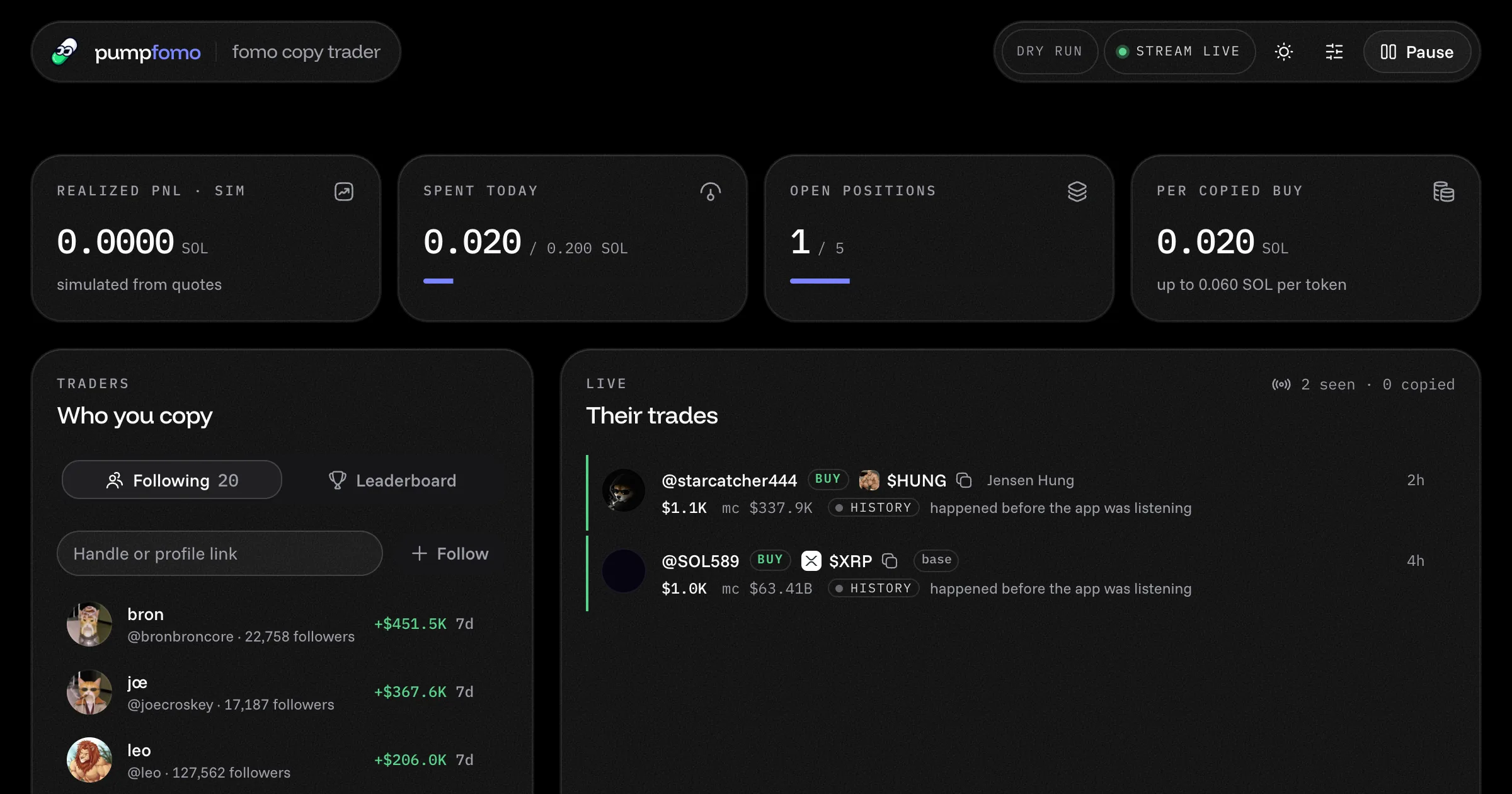
Copy fomo.family's best traders
A ready-made fomo.family copy trading bot. It follows the traders you pick, copies their Solana buys and sells within your limits, and shows everything on a live dashboard. Open source, with a live demo.
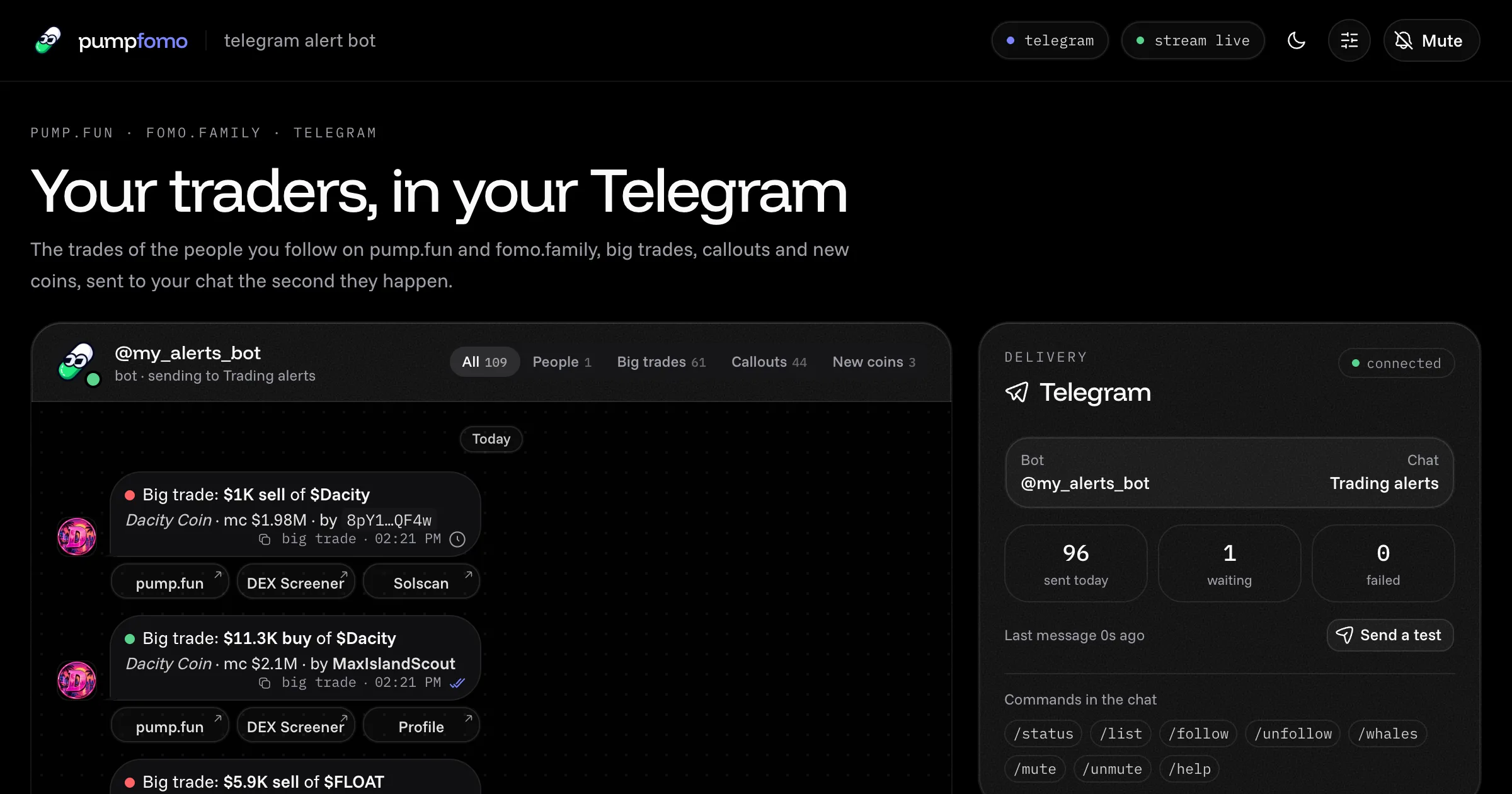
Your traders, in your Telegram
A ready-made Telegram bot that alerts you the moment the traders you follow buy or sell on pump.fun or fomo.family, plus big trades, callouts and new coins. Commands in the chat, a live dashboard, open source, with a demo.
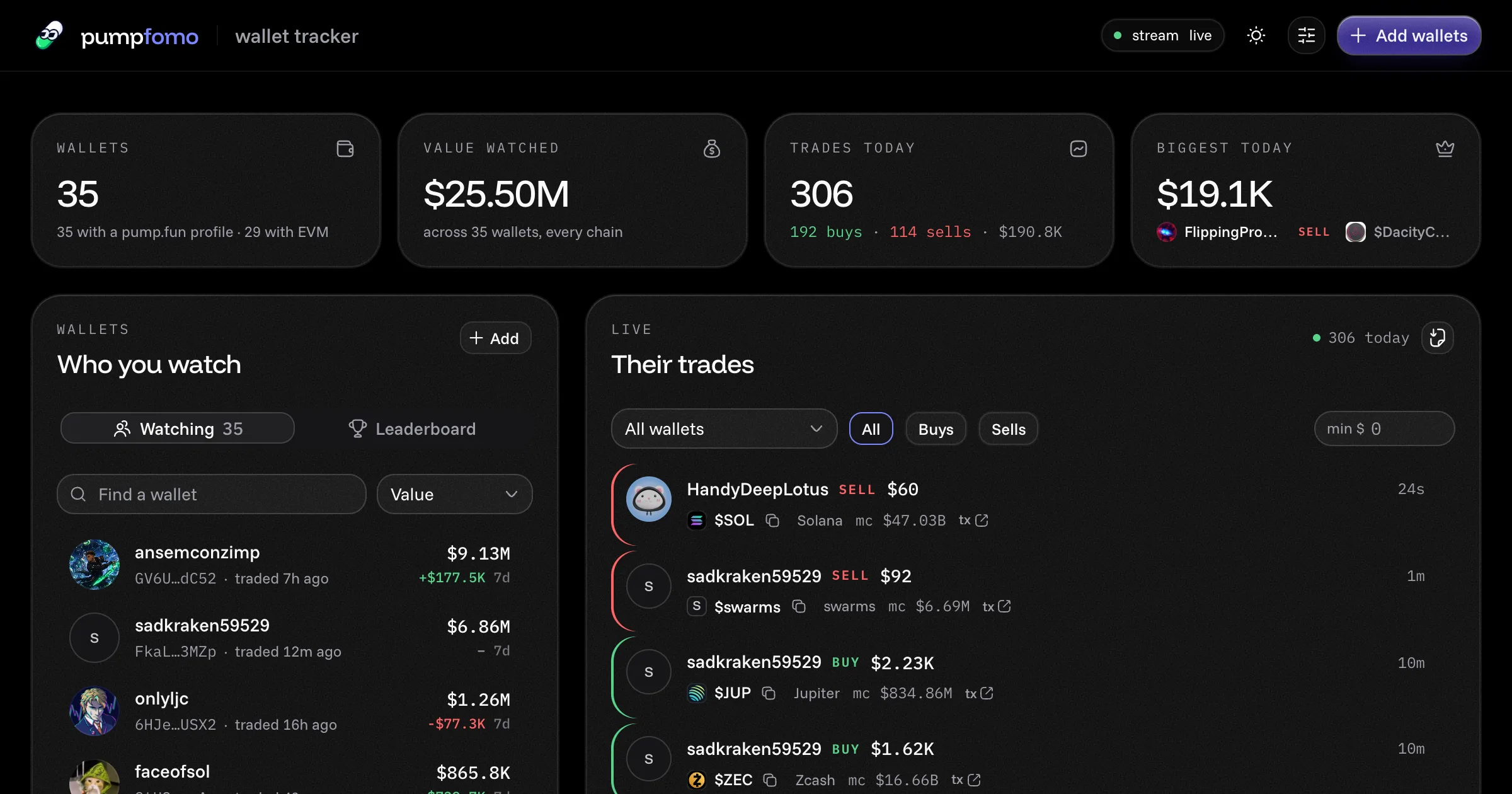
Watch any pump.fun wallet trade
A ready-made pump.fun wallet tracker. Watch any Solana or EVM wallets, see every trade they make within a second, with each wallet's value, 7-day PnL and holdings. Open source, with a live demo.
Catch new pump.fun coins as they take off
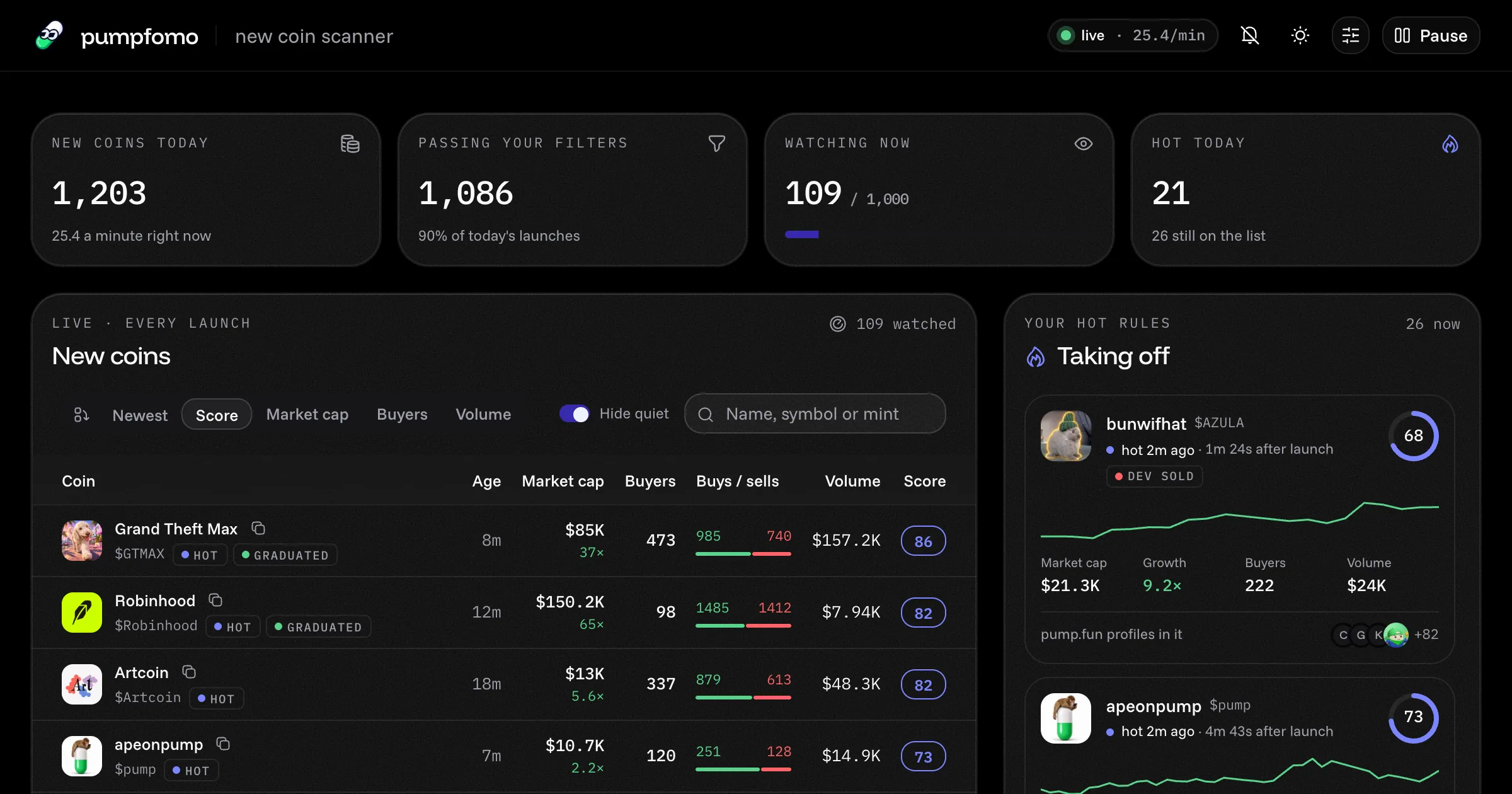
A ready-made pump.fun new coin scanner. It sees every coin the second it launches, watches its first trades live, scores its momentum and alerts you to the ones taking off. Open source, with a live demo.